
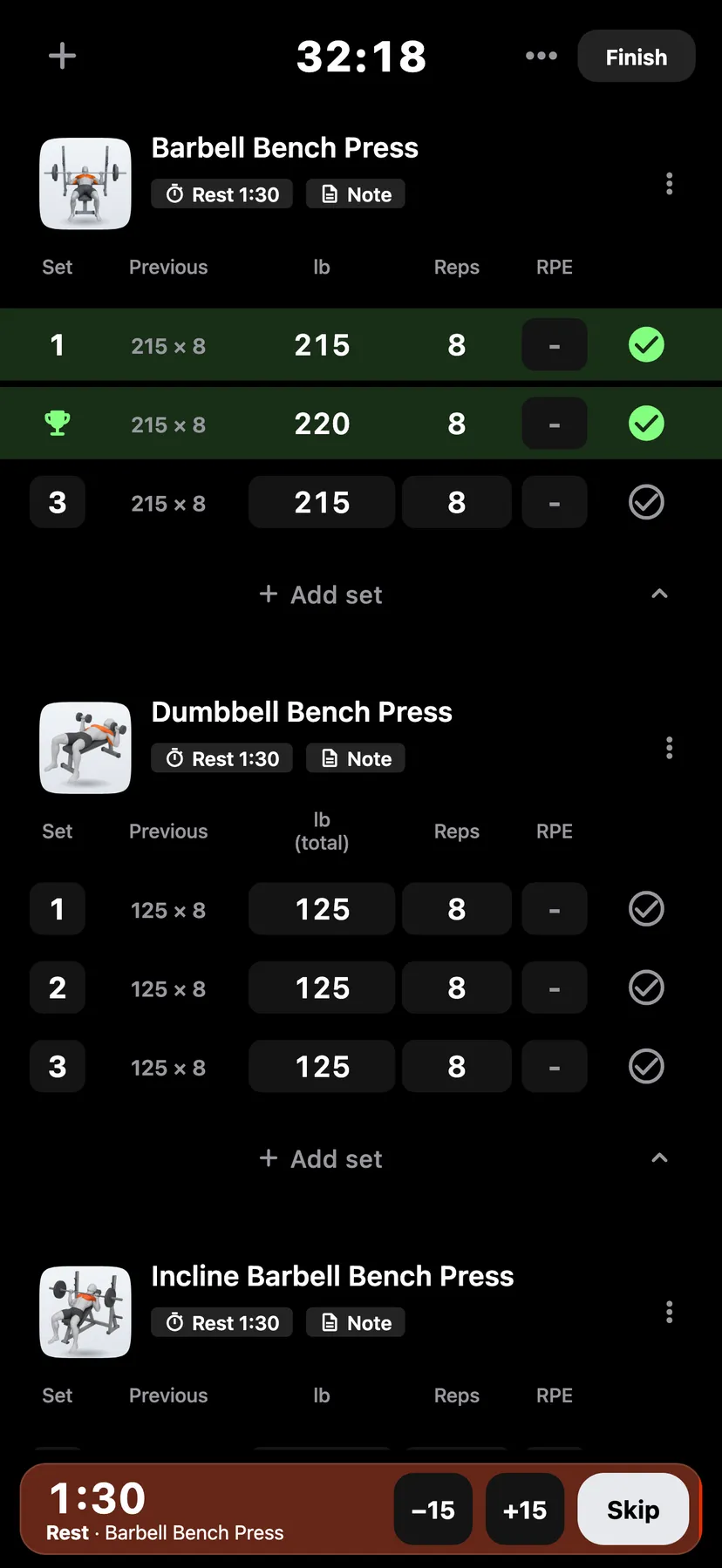
Example data
Live Records
While you type a working set, a line under it shows the fewest reps that would beat a record at that weight. When you tick a set that beats a record, a banner names the record and the gain.
WhereTrainthena workout
- 1
Type a set
Enter the weight of a working set. The line under the set gives the fewest reps that beat each of your rep-based records at that weight.
- 2
Enter reps that beat a record
Once the reps you type beat a record, the line lists the records the set would earn and each gain.
- 3
A trophy takes the place of the set's number. A banner shows the exercise, each record, its new value and the gain.
- 4
See a set's records
Tap the trophy. The sheet lists each record the set holds: the value it beat, its new value and the gain. To change a ticked set's type, untick it first; its number returns.
- 5
Open the record
Tap the banner to open the record's sheet, with the newest record, a trend of every record and the last four records with their sets.
Details
- Warm-up sets never earn a record.
- A set must be greater than the record to beat it. A later set in the same workout must also beat the workout's earlier sets.
- The first workout with an exercise sets its baseline and earns no record.
- The line under the set covers reps only. Records for a held time or a distance do not show there.
- The banner shows on any tab.
Related features
Checked against the app on November 13, 2026.