
Example data
Rest Timer
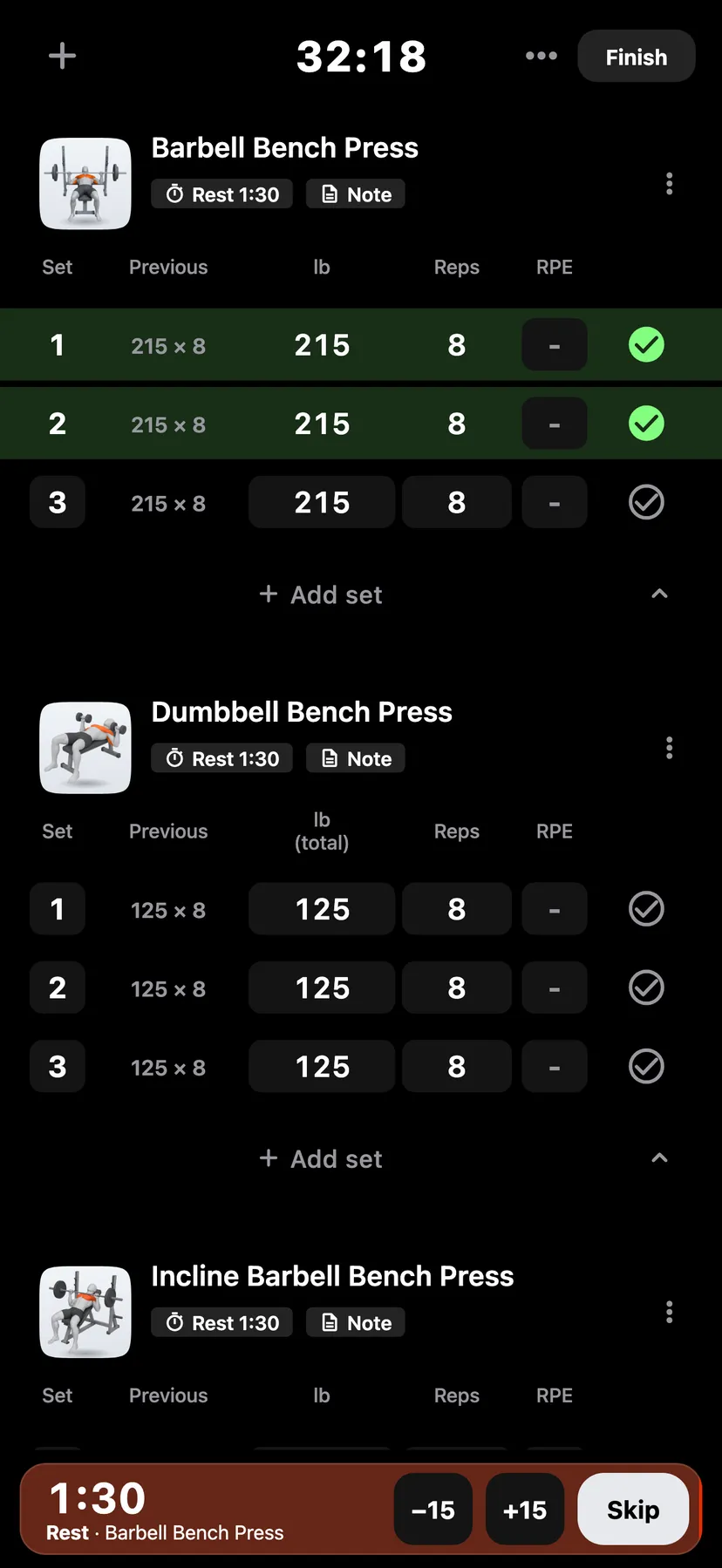
Ticking a set starts a rest countdown at the bottom of the workout. Each exercise can have its own rest length.
WhereTrainthena workout
- 1
The rest starts when you tick the set. A bar at the bottom of the workout shows the time left and empties as the rest runs.
- 2
Tap −15 or +15 to take off or add 15 seconds. Tap Skip to end the rest.
- 3
Tap the rest chip in the exercise's header. The Rest timer sheet opens with one wheel from Off to 6:00 in 15-second steps.
- 4
Turn the wheel to a length and tap Done. The length applies to that exercise in this workout. With Use for every workout on, Repva also saves it as that exercise's rest in later workouts.
- 5
Wait for the end
When the countdown ends, Repva shows Rest over and plays a sound and a haptic. A skipped rest ends silently.
Settings
- Default rest timer
- 90 seconds, used by every exercise without its own rest. On You, tap Training, then − or + beside Default rest timer.
Details
- Off applies to this workout only, or to this routine in the routine builder. Use for every workout cannot be turned on while the wheel reads Off.
- A warm-up set starts a rest only when its routine gives it one. A set followed by a drop set starts no rest unless you gave that set a rest.
- A rest set to Off starts no countdown.
- On Apple Watch, the rest screen has −15, +15, Pause and Skip.
Related features
Checked against the app on November 13, 2026.