
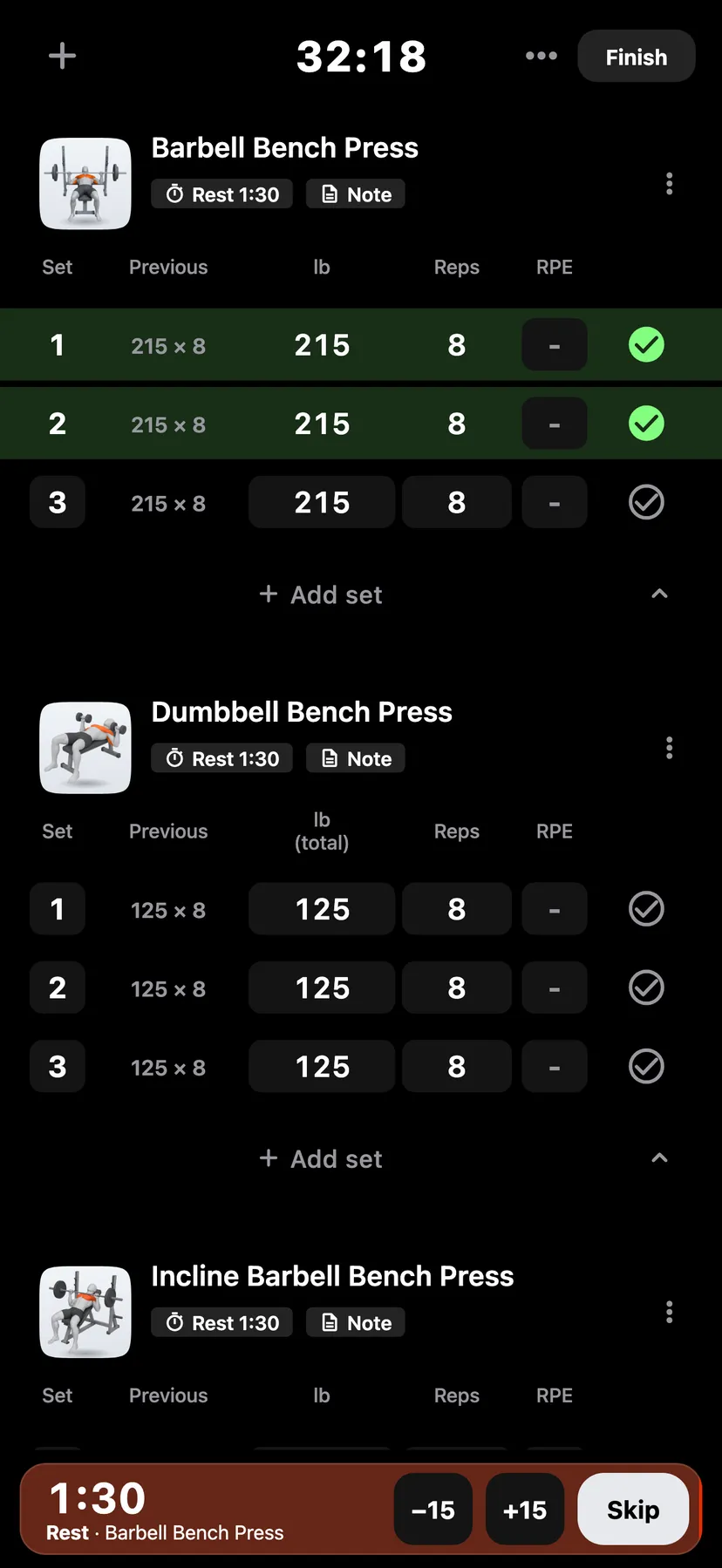
Example data
Previous Sets
The Previous column shows the most recent working set you logged for the exercise at the same set position. A tap copies it into the set.
WhereTrainthena workoutthenPrevious
- 1
Set 1 shows your last session's set 1, set 2 shows set 2, and so on. Warm-up sets never fill the column.
- 2
Tap the Previous value. The set's weight and reps fill in.
- 3
Ticking a set whose fields are blank fills them from Previous, then completes the set.
- 4
Choose from your last 5 sessions
Hold the Previous value to list your last 5 sessions of the exercise. Tap a session to fill the set from it.
- 5
On You, tap Training, then Previous workout values. Choose Any workout or Same routine.
Settings
- Previous workout values
- Any workout by default. With Same routine, a workout started from a routine shows the last time you did that routine.
Details
- With Same routine, an exercise that is new to the routine shows its last time in any workout.
- The Previous workout values setting stays on this iPhone.
- On Apple Watch, the last-time row always reads from any workout.
Related features
Checked against the app on November 13, 2026.